 Filmaris
Comparaison des IA texte vers vidéo 2026 — Quel outil est le meilleur ?
L'IA texte vers vidéo est passée de curiosité expérimentale à outil de production opérationnel. En 2026, les créateurs ont plus d'options que jamais — mais les outils diffèrent considérablement en qualité, tarification, capacité de montage et en ce que vous pouvez réellement faire avec le résultat. Certains génèrent des clips isolés. D'autres construisent des films entiers. Certains coûtent $0.03 par clip. D'autres facturent $20/mois pour des générations limitées.
Cette comparaison évalue les principales plateformes texte vers vidéo disponibles en mars 2026. Nous avons testé chacune sur les mêmes prompts, mesuré la qualité de sortie et comparé les tarifs, les fonctionnalités et les flux de travail. Que vous soyez un créateur solo, une équipe marketing ou un cinéaste, ce guide vous aide à choisir le bon outil pour vos besoins.
Tableau comparatif rapide
| Plateforme | Modèles | Éditeur de timeline | Tarification | Idéal pour |
|---|---|---|---|---|
| Filmaris | 50+ (Kling, Sora, Hunyuan, FLUX, etc.) | Multi-pistes complet | Forfait gratuit + crédits à partir de $0.03/clip | Production de films, projets multi-scènes |
| Runway Gen-3 | 1 propriétaire | Basique | $15–$95/mois | Clips rapides isolés, pinceau de mouvement |
| Pika 2.2 | 1 propriétaire | Aucun | $10–$60/mois | Clips pour réseaux sociaux, synchronisation labiale |
| Synthesia | Basé sur avatars | Éditeur de scènes | $30–$250/mois | Vidéos de présentateurs, contenu de formation |
| Kling (direct) | Kling 2.6/3.0 | Aucun | Crédits à partir de $0.20/clip | Clips isolés de haute qualité |
| Sora (direct) | Sora 2 | Storyboard | $20–$200/mois | Scènes photoréalistes, clips longs |
Ce qui différencie ces outils
La différence fondamentale entre les outils texte vers vidéo est le périmètre. La plupart des outils — Runway, Pika, Kling direct, Sora direct — génèrent des clips individuels à partir de prompts textuels. Vous tapez une description, obtenez un clip de 5 à 10 secondes, et c'est la fin du processus. Si vous voulez construire une vidéo multi-scènes, vous générez les clips séparément et les assemblez dans un éditeur traditionnel comme Premiere ou DaVinci Resolve.
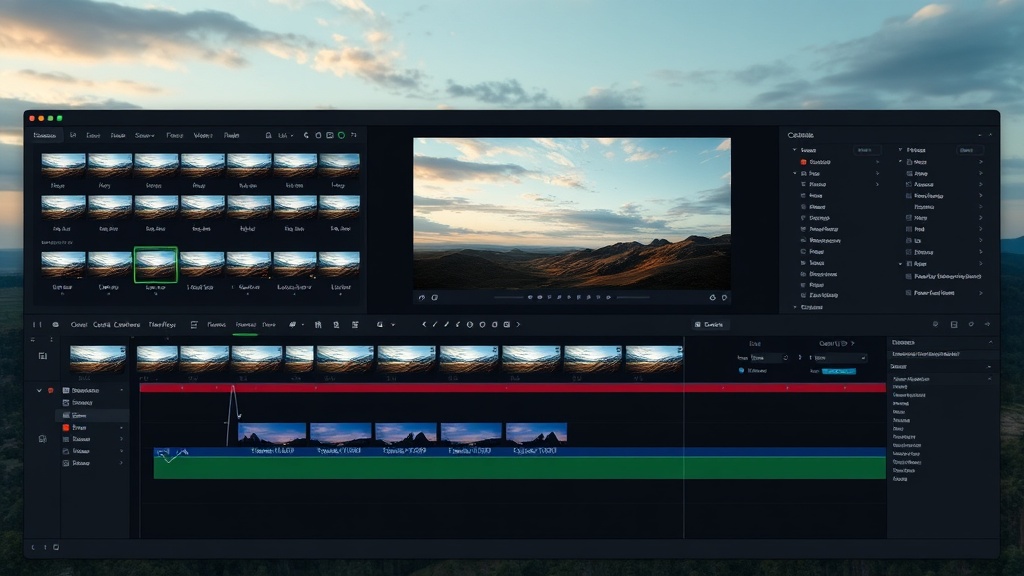
Filmaris adopte une approche différente : c'est une plateforme de texte vers film, pas simplement un générateur de clips. Vous décrivez un concept, et le générateur de scénarios IA construit un screenplay complet avec des scènes, des directions de caméra et des indications de dialogue. Ensuite, plus de 50 modèles IA génèrent vidéo, images, voix off, musique et effets sonores pour chaque scène. Tout atterrit sur une timeline multi-pistes professionnelle où vous arrangez, rognez, composez et exportez un film terminé — le tout dans le navigateur.
Analyses détaillées des plateformes
Filmaris — L'éditeur de films multi-modèles
Modèles : Plus de 50 modèles de 7 fournisseurs — Kling 2.6/3.0, Sora 2, Hunyuan, Hailuo, Pika, FLUX, DALL-E 3, ElevenLabs, OpenAI TTS, Stability Audio et plus encore.
Avantage unique : Filmaris est la seule plateforme qui vous permet de comparer les modèles côte à côte. Générez la même scène avec Kling, Sora et Hunyuan, comparez la qualité et le coût, puis choisissez le meilleur résultat. Vous n'êtes pas enfermé dans un seul modèle.
Tarification : Forfait gratuit avec 50 générations d'images/audio par mois. La génération vidéo utilise des crédits à partir de $0.03/clip (Hunyuan Fast) jusqu'à $0.40/clip (Sora 2). Les utilisateurs BYOK paient directement les fournisseurs et économisent 40 %. Aucun abonnement mensuel requis — achetez des crédits quand vous en avez besoin.
Timeline : Timeline de compositing multi-pistes complète avec opacité, volume, rognage, transitions (7 types) et contrôles de couches. Aperçu en temps réel propulsé par Remotion. Export en MP4 (HD/4K) ou FCPXML pour les NLE professionnels.
Idéal pour : Les créateurs qui veulent construire des films complets, pas seulement des clips isolés. Tous ceux qui veulent comparer les modèles avant de s'engager. Les utilisateurs soucieux de leur budget qui préfèrent une tarification au clip plutôt que des abonnements mensuels.
Runway Gen-3 — Le générateur de clips rapides
Modèles : Le modèle propriétaire Gen-3 Alpha de Runway. Haute qualité mais vous ne pouvez pas changer de modèle.
Tarification : $15/mois (Standard) à $95/mois (Illimité). Générations limitées sur les paliers inférieurs. Pas d'option au clip.
Points forts : Pinceau de mouvement pour un contrôle précis du mouvement. Bonne capacité image vers vidéo. Interface épurée pour la génération de clips simples.
Limitations : Un seul modèle — pas de comparaison possible. Pas de pipeline scénario-vers-film. Timeline basique. Abonnement mensuel avec limites de génération sur les paliers inférieurs. Pas d'option BYOK.
Idéal pour : Les designers qui ont besoin de clips isolés rapides avec un contrôle précis du mouvement. Les utilisateurs déjà dans l'écosystème Runway.
Pika 2.2 — L'accent sur les réseaux sociaux
Modèles : Le modèle propriétaire de Pika avec synchronisation labiale et fonctions d'expansion de scène.
Tarification : $10/mois (Basique) à $60/mois (Pro). Forfait gratuit avec des générations quotidiennes limitées.
Points forts : Synchronisation labiale performante pour les scènes de dialogue. « Pikaffects » pour des effets vidéo créatifs. Temps de génération rapides.
Limitations : Pas d'éditeur de timeline. Un seul modèle propriétaire. Focus sur les clips courts (4 à 10 secondes). Pas de génération audio. Pas d'écriture de scénario.
Idéal pour : Les créateurs de réseaux sociaux qui ont besoin de clips courts et accrocheurs avec synchronisation labiale ou effets.
Synthesia — Les présentateurs virtuels
Modèles : Génération basée sur des avatars — pas de texte vers vidéo généraliste. Des humains numériques réalistes délivrent des dialogues scénarisés.
Tarification : $30/mois (Starter) à $250/mois (Enterprise). Tarification à la minute sur les paliers supérieurs.
Points forts : Meilleure qualité de présentateur virtuel du marché. Plus de 230 options d'avatars. Plus de 140 langues. Professionnel pour la formation en entreprise et les vidéos explicatives.
Limitations : Ce n'est pas un outil texte vers vidéo généraliste — ne produit que du contenu basé sur des avatars. Pas de génération visuelle créative. Pas de séquences cinématiques. Très coûteux pour un usage occasionnel.
Idéal pour : Les vidéos de formation en entreprise, l'intégration RH, les vidéos explicatives avec un présentateur humain. Non adapté à la réalisation créative.
Kling et Sora en direct — Accès brut aux modèles
Kling (via Kuaishou) et Sora (via OpenAI) offrent tous deux un accès direct à leurs modèles. La qualité est excellente, mais vous obtenez des clips bruts sans montage, sans audio, sans écriture de scénario et sans gestion de projet. Vous devez gérer l'assemblage vous-même.
Différence clé avec Filmaris : Filmaris vous donne accès à Kling ET Sora (plus 48 autres modèles) via une interface unique avec un éditeur de timeline. Utiliser Kling ou Sora directement vous donne un modèle et un clip à la fois.
Comparaison des fonctionnalités : Ce qui compte le plus
Variété de modèles
C'est le plus grand avantage de Filmaris. Avec plus de 50 modèles pour la vidéo, l'image, l'audio et le texte, vous pouvez toujours choisir le meilleur modèle pour chaque tâche. Hunyuan Fast pour les brouillons économiques ($0.03), Kling 2.6 pour l'équilibre qualité-prix ($0.20), Sora 2 pour la qualité maximale ($0.40). Toute autre plateforme vous enferme dans un seul modèle.
Timeline et montage
Filmaris est la seule plateforme texte vers vidéo avec une timeline multi-pistes professionnelle. Runway dispose d'un éditeur basique. Synthesia a un éditeur basé sur les scènes. Pika, Kling direct et Sora direct n'ont aucune capacité de montage — vous obtenez un clip et c'est tout.
Génération audio
Filmaris génère de la voix off (ElevenLabs, OpenAI TTS), de la musique (Stability Audio, ACE-Step) et des effets sonores en parallèle de la vidéo. Aucun autre outil texte vers vidéo n'offre une génération multimodale intégrée.
Structure tarifaire
Filmaris utilise une tarification au clip sans abonnement mensuel. Runway, Pika et Synthesia requièrent des abonnements mensuels avec des limites de génération. Pour les utilisateurs occasionnels, la tarification au clip est bien plus rentable. Pour les utilisateurs intensifs, l'option BYOK de Filmaris permet d'économiser 40 % supplémentaires.
Pipeline scénario-vers-film
Seul Filmaris offre une automatisation complète du scénario au film : vous fournissez un concept, l'IA écrit le screenplay, génère tous les médias et les assemble sur une timeline. Tout autre outil exige que vous rédigiez des prompts individuels pour des clips individuels.
Comparaison des tarifs : Scénarios concrets
| Scénario | Filmaris | Runway Gen-3 | Pika 2.2 |
|---|---|---|---|
| 1 clip (5s) | $0.03–$0.40 | $15/mois minimum | $10/mois minimum |
| 10 clips (lot réseaux sociaux) | $0.30–$4.00 | $15/mois | $10/mois |
| Film d'1 minute (12 clips + audio) | $2–$5 | $35/mois + audio externe | Impossible (pas de timeline) |
| Film de 5 minutes | $10–$25 (ou ~$6–$15 avec BYOK) | $95/mois + audio externe + NLE | Impossible |
Verdict : Quelle IA texte vers vidéo choisir ?
Choisissez Filmaris si : Vous voulez créer des vidéos ou des films complets — pas seulement des clips isolés. Vous voulez accéder à plusieurs modèles IA et une tarification au clip. Vous avez besoin d'un éditeur de timeline, de génération audio et d'automatisation de scénario dans un seul outil.
Choisissez Runway si : Vous avez besoin de clips isolés rapides avec un contrôle de mouvement par pinceau et êtes à l'aise avec un abonnement mensuel pour un seul modèle.
Choisissez Pika si : Vous vous concentrez sur de courts clips pour les réseaux sociaux et avez besoin de synchronisation labiale. Vous n'avez pas besoin de timeline ni de génération audio.
Choisissez Synthesia si : Vous avez besoin de vidéos de présentateurs virtuels pour la formation en entreprise ou l'éducation. Vous ne faites pas de réalisation créative.
Choisissez Kling/Sora en direct si : Vous n'avez besoin que de clips bruts d'un modèle spécifique et gérerez vous-même tout le montage, l'audio et l'assemblage dans un autre outil.
Pour la plupart des créateurs, Filmaris offre la meilleure combinaison de variété de modèles, de flexibilité tarifaire et de capacité de production. Commencez avec le forfait gratuit — 50 générations d'images et audio par mois, accès complet à la timeline, aucune carte bancaire requise.
Questions fréquemment posées
Quelle IA texte vers vidéo offre la meilleure qualité ?
La qualité dépend du modèle, pas de la plateforme. Kling 3.0 et Sora 2 produisent les clips vidéo de la plus haute qualité en 2026. Filmaris vous donne accès aux deux — plus 48 autres modèles — pour que vous puissiez comparer et choisir le meilleur résultat pour chaque scène.
Quelle est l'IA texte vers vidéo la moins chère ?
Filmaris avec Hunyuan Fast à $0.03 par clip est l'option la moins chère. Le forfait gratuit inclut 50 générations d'images et audio mensuelles. Les utilisateurs BYOK paient directement les fournisseurs pour des économies supplémentaires allant jusqu'à 40 %.
Puis-je créer une vidéo complète à partir de texte, pas seulement des clips ?
Seul Filmaris offre un pipeline complet de texte vers film : l'IA écrit le scénario, génère vidéo/images/audio pour chaque scène et place tout sur une timeline multi-pistes. Les autres outils génèrent des clips individuels que vous devez assembler ailleurs.
Ai-je besoin d'un abonnement mensuel ?
Filmaris utilise des crédits au clip sans abonnement requis. Runway ($15 à $95/mois), Pika ($10 à $60/mois) et Synthesia ($30 à $250/mois) requièrent tous des abonnements mensuels. Pour un usage occasionnel, la tarification au clip est nettement moins chère.
Guides connexes
- Meilleurs générateurs vidéo IA 2026 — Comparaison approfondie des modèles
- Réalisation de films par IA : Guide complet du débutant — Tutoriel étape par étape
- Comment créer un film avec l'IA — Guide complet du flux de travail
- Texte vers vidéo IA — Essayez par vous-même
- Fonctionnalités — Liste complète des fonctionnalités
- Tarifs — Crédits et forfaits