2026 में टेक्स्ट टू वीडियो AI तुलना — कौन सा टूल सबसे अच्छा है?
टेक्स्ट-टू-वीडियो AI प्रयोगात्मक जिज्ञासा से प्रोडक्शन-रेडी टूल बन चुका है। 2026 में, क्रिएटर्स के पास पहले से कहीं ज़्यादा विकल्प हैं — लेकिन टूल्स क्वालिटी, प्राइसिंग, एडिटिंग क्षमता और आउटपुट के उपयोग में काफ़ी अलग हैं। कुछ सिंगल क्लिप्स जेनरेट करते हैं। अन्य पूरी फ़िल्में बनाते हैं। कुछ $0.03 प्रति क्लिप। कुछ $20/महीना लेकिन लिमिटेड जेनरेशन।
क्विक तुलना तालिका
| प्लेटफ़ॉर्म | मॉडल | Timeline एडिटर | प्राइसिंग | सर्वश्रेष्ठ उपयोग |
|---|---|---|---|---|
| Filmaris | 50+ (Kling, Sora, Hunyuan, FLUX आदि) | फ़ुल मल्टी-ट्रैक | फ़्री टियर + क्रेडिट $0.03/क्लिप से | फ़िल्म प्रोडक्शन, मल्टी-सीन प्रोजेक्ट्स |
| Runway Gen-3 | 1 प्रॉपराइटरी | बेसिक | $15–$95/माह | क्विक सिंगल क्लिप्स, मोशन ब्रश |
| Pika 2.2 | 1 प्रॉपराइटरी | नहीं | $10–$60/माह | सोशल मीडिया क्लिप्स, लिप सिंक |
| Synthesia | अवतार-बेस्ड | सीन एडिटर | $30–$250/माह | टॉकिंग हेड वीडियो, ट्रेनिंग कंटेंट |
| Kling (डायरेक्ट) | Kling 2.6/3.0 | नहीं | क्रेडिट $0.20/क्लिप से | सिंगल हाई-क्वालिटी क्लिप्स |
| Sora (डायरेक्ट) | Sora 2 | स्टोरीबोर्ड | $20–$200/माह | फ़ोटोरियलिस्टिक सीन्स, लॉन्ग क्लिप्स |
इन टूल्स में क्या अंतर है
मूलभूत अंतर स्कोप का है। ज़्यादातर टूल्स — Runway, Pika, Kling डायरेक्ट, Sora डायरेक्ट — टेक्स्ट प्रॉम्प्ट से सिंगल क्लिप्स जेनरेट करते हैं। मल्टी-सीन वीडियो चाहिए तो अलग से क्लिप्स जेनरेट करके ट्रेडिशनल एडिटर में जोड़ना पड़ता है।
Filmaris अलग अप्रोच लेता है: यह टेक्स्ट-टू-फ़िल्म प्लेटफ़ॉर्म है। आप कॉन्सेप्ट बताएं, AI स्क्रिप्ट जेनरेटर पूरी स्क्रीनप्ले बनाता है, फिर 50+ AI मॉडल हर सीन के लिए वीडियो, इमेज, वॉइसओवर, म्यूज़िक और साउंड इफ़ेक्ट्स जेनरेट करते हैं — सब एक प्रोफ़ेशनल मल्टी-ट्रैक Timeline पर।
विस्तृत प्लेटफ़ॉर्म रिव्यू
Filmaris — मल्टी-मॉडल फ़िल्म एडिटर
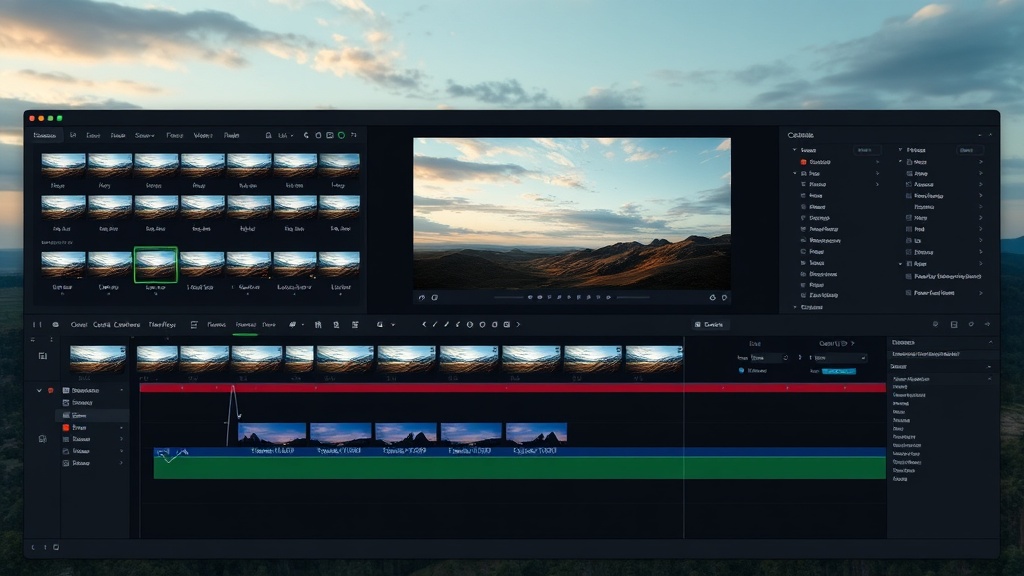
मॉडल: 7 प्रोवाइडर्स से 50+ मॉडल — Kling, Sora, Hunyuan, Hailuo, Pika, FLUX, DALL-E 3, ElevenLabs, OpenAI TTS, Stability Audio और अधिक।
यूनीक एडवांटेज: Filmaris एकमात्र प्लेटफ़ॉर्म है जहां आप मॉडल साइड-बाय-साइड कम्पेयर कर सकते हैं। एक ही सीन Kling, Sora और Hunyuan से जेनरेट करें, क्वालिटी और कॉस्ट कम्पेयर करें, बेस्ट रिज़ल्ट चुनें।
प्राइसिंग: फ़्री टियर 50 इमेज/ऑडियो जेनरेशन/माह। वीडियो $0.03/क्लिप (Hunyuan Fast) से $0.40/क्लिप (Sora 2)। BYOK यूज़र्स 40% बचाते हैं। कोई मंथली सब्सक्रिप्शन ज़रूरी नहीं।
Timeline: फ़ुल मल्टी-ट्रैक कम्पोज़िटिंग, 7 ट्रांज़िशन टाइप्स, Remotion प्रीव्यू। MP4 (HD/4K) या FCPXML एक्सपोर्ट।
सर्वश्रेष्ठ: पूरी फ़िल्में बनाने वाले क्रिएटर्स। मॉडल कम्पेयर करने चाहने वाले। मंथली सब्सक्रिप्शन की बजाय पर-क्लिप प्राइसिंग चाहने वाले।
Runway Gen-3 — क्विक क्लिप जेनरेटर
प्राइसिंग: $15/माह से $95/माह। लिमिटेड जेनरेशन, सिंगल मॉडल, बेसिक Timeline, नो BYOK।
सर्वश्रेष्ठ: मोशन ब्रश कंट्रोल के साथ क्विक सिंगल क्लिप्स।
Pika 2.2 — सोशल मीडिया फ़ोकस
प्राइसिंग: $10/माह से $60/माह। स्ट्रॉन्ग लिप सिंक, नो Timeline, नो ऑडियो जेनरेशन।
सर्वश्रेष्ठ: शॉर्ट सोशल मीडिया क्लिप्स।
Synthesia — अवतार टॉकिंग हेड्स
प्राइसिंग: $30/माह से $250/माह। जनरल टेक्स्ट-टू-वीडियो नहीं — सिर्फ़ अवतार-बेस्ड कंटेंट।
सर्वश्रेष्ठ: कॉर्पोरेट ट्रेनिंग, HR ऑनबोर्डिंग। क्रिएटिव फ़िल्मनिर्माण के लिए नहीं।
Kling और Sora डायरेक्ट — रॉ मॉडल एक्सेस
दोनों बेहतरीन क्वालिटी देते हैं, लेकिन रॉ क्लिप्स — नो एडिटिंग, नो ऑडियो, नो स्क्रिप्ट, नो प्रोजेक्ट मैनेजमेंट। Filmaris में दोनों (+ 48 और मॉडल) एक इंटरफ़ेस से Timeline एडिटर के साथ मिलते हैं।
फ़ीचर तुलना: सबसे ज़रूरी क्या है
मॉडल वैरायटी
Filmaris का सबसे बड़ा एडवांटेज। 50+ मॉडल। बाकी सब एक मॉडल में लॉक करते हैं।
Timeline और एडिटिंग
Filmaris एकमात्र प्रोफ़ेशनल मल्टी-ट्रैक Timeline वाला प्लेटफ़ॉर्म। Pika, Kling डायरेक्ट, Sora डायरेक्ट में कोई एडिटिंग नहीं।
ऑडियो जेनरेशन
Filmaris वॉइसओवर, म्यूज़िक और साउंड इफ़ेक्ट्स वीडियो के साथ जेनरेट करता है। कोई और प्लेटफ़ॉर्म इंटीग्रेटेड मल्टी-मोडल जेनरेशन नहीं देता।
कॉस्ट स्ट्रक्चर
Filmaris: पे-पर-क्लिप, नो सब्सक्रिप्शन। Runway, Pika, Synthesia: मंथली सब्सक्रिप्शन + लिमिट्स। BYOK से अतिरिक्त 40% बचत।
प्राइस तुलना: रियल-वर्ल्ड सीनारियो
| सीनारियो | Filmaris | Runway Gen-3 | Pika 2.2 |
|---|---|---|---|
| 1 क्लिप (5s) | $0.03–$0.40 | मिनिमम $15/माह | मिनिमम $10/माह |
| 10 क्लिप्स (सोशल मीडिया बैच) | $0.30–$4.00 | $15/माह | $10/माह |
| 1-मिनट फ़िल्म (12 क्लिप्स + ऑडियो) | $2–$5 | $35/माह + एक्सटर्नल ऑडियो | संभव नहीं (नो Timeline) |
| 5-मिनट फ़िल्म | $10–$25 (या BYOK से ~$6–$15) | $95/माह + एक्सटर्नल ऑडियो + NLE | संभव नहीं |
फ़ैसला: कौन सा टेक्स्ट-टू-वीडियो AI चुनें?
Filmaris चुनें अगर: आप पूरे वीडियो या फ़िल्में बनाना चाहते हैं। मल्टीपल AI मॉडल और पे-पर-क्लिप प्राइसिंग चाहिए। एक टूल में Timeline एडिटर, ऑडियो जेनरेशन और स्क्रिप्ट ऑटोमेशन चाहिए।
Runway चुनें अगर: मोशन ब्रश कंट्रोल के साथ क्विक सिंगल क्लिप्स चाहिए।
Pika चुनें अगर: शॉर्ट सोशल मीडिया क्लिप्स + लिप सिंक। Timeline या ऑडियो ज़रूरी नहीं।
Synthesia चुनें अगर: कॉर्पोरेट ट्रेनिंग के लिए अवतार टॉकिंग-हेड वीडियो। क्रिएटिव फ़िल्मनिर्माण नहीं।
Kling/Sora डायरेक्ट चुनें अगर: सिर्फ़ एक मॉडल से रॉ क्लिप्स चाहिए और बाकी सब खुद करेंगे।
ज़्यादातर क्रिएटर्स के लिए, Filmaris मॉडल वैरायटी, प्राइसिंग फ़्लेक्सिबिलिटी और प्रोडक्शन कैपेबिलिटी का सबसे अच्छा कॉम्बिनेशन देता है। फ़्री टियर से शुरू करें — 50 इमेज/ऑडियो जेनरेशन/माह, फ़ुल Timeline, नो क्रेडिट कार्ड।
अक्सर पूछे जाने वाले प्रश्न
किस टेक्स्ट-टू-वीडियो AI की क्वालिटी सबसे अच्छी है?
क्वालिटी मॉडल पर निर्भर करती है, प्लेटफ़ॉर्म पर नहीं। Kling 3.0 और Sora 2 सबसे हाई क्वालिटी देते हैं। Filmaris दोनों (+ 48 और) एक्सेस देता है।
सबसे सस्ता टेक्स्ट-टू-वीडियो AI कौन सा है?
Filmaris + Hunyuan Fast = $0.03 प्रति क्लिप। फ़्री टियर में 50 इमेज/ऑडियो जेनरेशन/माह। BYOK से 40% और बचत।
क्या टेक्स्ट से पूरा वीडियो बन सकता है, सिर्फ़ क्लिप्स नहीं?
सिर्फ़ Filmaris कम्प्लीट टेक्स्ट-टू-फ़िल्म पाइपलाइन देता है: AI स्क्रिप्ट लिखता है, हर सीन के लिए वीडियो/इमेज/ऑडियो जेनरेट करता है, सब मल्टी-ट्रैक Timeline पर रखता है।
क्या मंथली सब्सक्रिप्शन ज़रूरी है?
Filmaris: पे-पर-क्लिप, नो सब्सक्रिप्शन। Runway ($15–$95/माह), Pika ($10–$60/माह), Synthesia ($30–$250/माह) सब मंथली सब्सक्रिप्शन मांगते हैं।
संबंधित गाइड
- 2026 के सर्वश्रेष्ठ AI वीडियो जेनरेटर — गहराई से मॉडल तुलना
- AI फ़िल्म निर्माण: संपूर्ण शुरुआती गाइड — चरण-दर-चरण ट्यूटोरियल
- AI से मूवी कैसे बनाएं — पूरा वर्कफ़्लो वॉकथ्रू
- टेक्स्ट टू वीडियो AI — खुद आज़माएं
- फ़ीचर्स — पूरी फ़ीचर सूची
- प्राइसिंग — क्रेडिट्स और प्लान्स